Forums › English Language Forums › Technical › Technical Issues

Search

Shading/Shadow Issue

5 replies [Last post]
Sun, 10/09/2011 - 10:09
Bremeno's picture
Bremeno

Hello, I am new to posting on this forum so please mind my potentially poor etiquette.

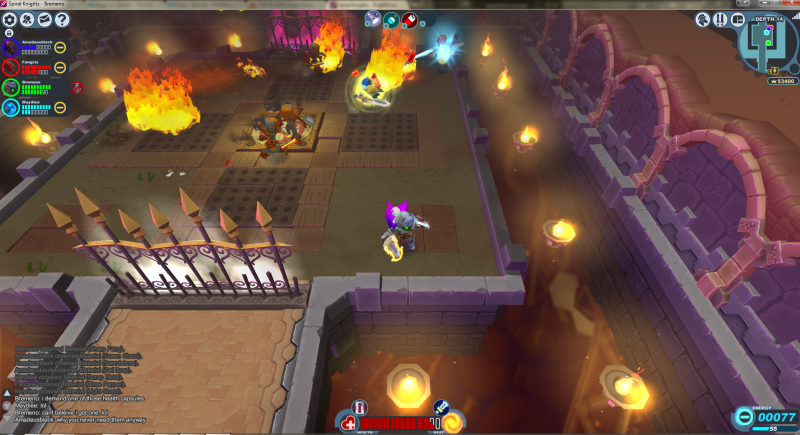
In the last week or so, I have had a problem in which the third room of any arena will have an odd shading issue. This can range from big dark boxes on the floor following around enemies to certain portions of the room just being darker than others (always in big blocky formations) to just the entire floor being darker than the rest of the dungeon. The photo I've (attempted) to post with this is an example of the entire floor being of a darker shade.

http://i90.photobucket.com/albums/k266/Brysch/shadingissue.png

Just wondering if anyone knows what may cause this, and if there are any solutions.

Sorry if there is another thread that addresses this, I could not find one.

Sun, 10/09/2011 - 10:32
#1
Starlinvf's picture
Starlinvf
What video card do you have?

What video card do you have?

Sun, 10/09/2011 - 10:49
#2
Bremeno's picture
Bremeno
Vid Card

GeForce GTX570 HD

Sun, 10/09/2011 - 11:09
#3
Starlinvf's picture
Starlinvf
That card shouldn't have any

That card shouldn't have any rendering issues. If its consistent, I would suspect some file damage.... unless you recently updated your video drivers, in which case it might be a driver bug.

Sun, 10/09/2011 - 11:21
#4
Bremeno's picture
Bremeno
Drivers have not been updated

Drivers have not been updated recently enough for me to make that assumption; I would like to note that while it does not happen every time I enter the arena (just tried another so I could get more screenies, no shadow problems) it is fairly frequent. This issue never happens anywhere other than the third room of arenas. How do I go about testing for file damage?

EDIT: I play through Steam, if that makes any difference to file check/recovery protocol

Sun, 10/09/2011 - 11:40
#5
Starlinvf's picture
Starlinvf
You can have it unpack the

You can have it unpack the game resources again by deleting unpacked.dat from the main SK folder, then deleting everything inside the \rsrc\ folder EXCEPT the .jar and .jarv files. The launcher only monitors the jar files to detect updates, but doesn't even check unpacked files for corruption once an update is validated.

The Steam integrity check is pretty useless since the manifest only monitors files used in the base install (ie the jars), and the hashes are based on the mid august client (really old). It basically does the same thing as reinstalling, but is slower and more prone to making mistakes for some reason.

Powered by Drupal, an open source content management system