I live in England and I got quite a bit of latency playing both PvE and PvP before the EU servers were introduced. Now it's worse. The lag I get in PvE is mostly frame lag (often freezes that last several seconds) and slower loading times. In PvP it's being pulled all over the map. My knight won't be doing the walking animation, I'll just zoom left or right or up or down in a stationary stance, especially if I'm in combat. I also find a lot of my attacks fail (I'll swing my sword and it'll half complete the animation and then stop as if I've been interrupted when I haven't) or I'll click to attack and my knight will charge the weapon for a second before stopping. I also get big drops in frame rate sometimes, but less frequently. Unfortunately, going back to the US servers isn't much of an alternative because I get mad latency on those too.
Any idea what's up? Am I just cursed?
EU Servers no better than US servers

Four.

lend me one or two :p

FPS drops aren't caused by network latency, what you are describing sounds like CPU overload. Did you try the performance tweaks for the JVM?

For the sake sanity, what happens if your connection forced to US East?
@Lufte Yes, I've tried all the tweaks I can find on the forum. My system more than meets the basic requirements of the game and I often close everything except SK when the lag gets bad and it doesn't help. I'm aware that some of what I'm getting is on my end, but I haven't complained about that. I got that on the US servers and I've had it since I started playing so I've adapted to it. Everything I mentioned in the OP is additional to the lag I had on the US servers. I get latency too - bars flying out of people seconds after I hit them, finding myself dead/damaged before I see anyone/anything slash at me, etc. but none of that is new.
@Starlinvf Exactly what was happening before the server update. My connection is at two bars 80% of the time, one bar 15% of the time and three bars only when I'm in haven and even then not consistently. I'd get the rubber band effect a lot and occasionally I'd have people continuing to run off my screen (which I also get on the EU servers). Everything I listed above is in addition to the lag I was already suffering.

Do you play any other games and do they lag?
It definite should be a problem on your side.
Nothing as demanding as SK.
How can it be a problem on my end when it only happens with the EU servers?
Maybe it is a problem with your ISP? That could be an explanation, although very unlikely. Do you have any friends near you who also play SK and could provide some feedback?
Sort of. There's a guy at college I know who occasionally plays but I'd have to wait til January to see him again because we're not friends as such. Is my ISP likely to cause problems with certain servers?
The behavior screams packet loss, so if your local connection is running error free its likely to be a routing problem somewhere or very poorly configured backend QOS.
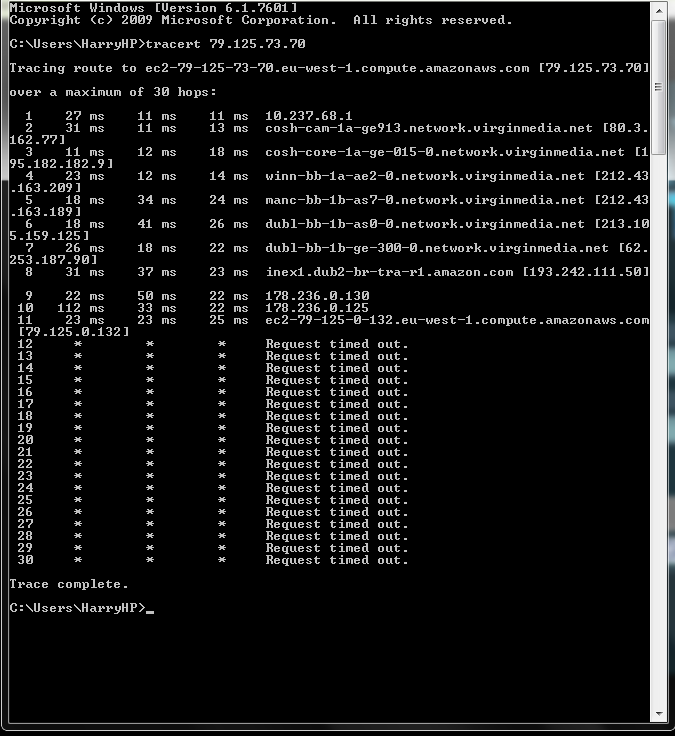
One of the EU server IPs is 79.125.73.70. Do a tracert to it and see which way its going.
I can't say I know what most of it means so I took a screenshot for you.
I did it twice to check and it still times out at 12.

My SK is completely fine (low lag etc. on most days) and my tracert also times out at the same point (eu-west-1.compute.amazonaws.com) so I doubt that means anything.
@Evilduck: Thats normal for that network.
In most cases your pointed to a server at the edge of the network, but with cloud/cluster systems, your target is buried deep behind a set of firewalls and private networks where traceroutes can't find their way back. The main thing is being able to reach that edge without signs of packet loss or high latency.
Next thing to try is disabling any security software you have installed that might be scanning the traffic. If that doesn't work, then try a direct connection to the modem. If its one of those router/modem combos, you should be able to go in and setup bridge mode to bypass the internal firewall. I would also check the WAN error stats while your in there just to make sure its fairly clean.
You're talking about my modem setup, right? It's a router/modem combo and I have no idea what you just said. =/

So how many bars do you have?