Forums › English Language Forums › Technical › Technical Issues

Search

Losing "Signal"?

6 replies [Last post]
Thu, 03/01/2012 - 21:31
Sykocaster's picture
Sykocaster

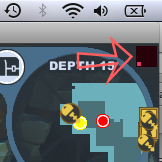
http://i211.photobucket.com/albums/bb267/SykoCaster/Picture30-2.png

This little icon that looks like a cell-phone signal indicator. What is it, and how do I stop it from going down?
It seems it just goes up and down, and when it'd down, I rubberband all over the place, making combat impossible.
As you can see, I have a very solid internet connection, (which I should, since I'm sitting only a few feet from my router) so it can't be reflecting that.
My internet isn't slowing down, either. It seems to ONLY affect Spiral, and nothing else.
Is there anything I can do about it?

Thu, 03/01/2012 - 22:25
#1
Starmandeluxe's picture
Starmandeluxe
If you aren't using a wired

If you aren't using a wired connection, check your router's wireless settings. There might be something there throwing your wireless adaptor off at certain intervals. A few examples would be:

  • Your fragmentation threshold may be too low or your RTS/CTS threshold could be too high. This would only affect large packets, so if you only do some light browsing when you aren't playing Spiral Knights this is probably the case.
  • Your beacon interval may be too high. Anything higher than 200 could cause connection problems and even then 200 is considered "risky".
  • Your router may be operating in G-Only or B-Only mode. There are a few wireless adaptors from less-than-reliable companies that promise 801.11b/g adaptors, but in reality they're actually slower in g mode than b mode. Try setting your router to Mixed mode if it isn't already.

The later two would be noticeable outside of Spiral Knights, but they could be worth a try.

Aside from that, you could try configuring Java to connect directly rather than using your browser's settings from the Java control panel.

Thu, 03/01/2012 - 22:51
#2
Sykocaster's picture
Sykocaster
Naw, I'm almost certain it's

Naw, I'm almost certain it's not a router issue. I don't have this occurring with any other online gaming I do with this, or any other computer. Though I will check anyway, just in case, thanks.

Thu, 03/01/2012 - 23:08
#3
Sykocaster's picture
Sykocaster
Fragmentation threshold is at

Fragmentation threshold is at the default, which is also it's maximum, so that's not going to be too low.
Beacon interval is set to 75, which is lower than default, and I can't see being an issue at that value.
And my router is in mixed mode.
Only thing I wasn't able to find was the RTS/CTS threshold, and that's just because I don't have the admin password at hand. But that's probably at or around default as well.

The Java bit, I'm not entirely sure how to do. What should I be googling to find out?

Fri, 03/02/2012 - 07:47
#4
Starmandeluxe's picture
Starmandeluxe
This is a guide from Sun on

This is a guide from Sun on how to use the Java control panel. The part about changing your type of connection is near the top, right under the first picture.

Huh, a slow internet connection while playing games really sounds like a threshold being too high or low. Thank you for trying anyway. :/

Wed, 03/07/2012 - 16:18
#5
Sykocaster's picture
Sykocaster
That's the weird thing.

That's the weird thing. I don't lose connection to the whole internet. Just Spiral. If, when the little Signal indicator thing is red, like it is in the picture in my OP, everything else I try internet related seems to run fine. My in/out rate doesn't change, and if I try to do something, such as loading a video on Youtube or play Pandora (as tests, not during normal play, of course) the speed doesn't seem any less. If it is, it's nothing I can notice without precisely timing.

Wed, 03/07/2012 - 23:48
#6
Starmandeluxe's picture
Starmandeluxe
There's no wireless

There's no wireless interference near you either? You don't play near a microwave, live next to an RC car race track, own a HAM radio, or anything like that?

Powered by Drupal, an open source content management system