Forums › English Language Forums › General › General Discussion

Buscar

Gamepad control layouts

8 respuestas [Último envío]
Mar, 04/30/2013 - 06:31
Imagen de Autofire
Autofire

Hello!

This thread is for comparing control control schemes on gamepads and possibly other controllers. Keep in mind that not everyone has Xbox 360 controllers or anything fancy like that, so instead of of saying Triangle and Square, try to use this list instead. You can copy and paste it in your post.

If something isn't on your gamepad, leave it out. If there's something which you have which isn't on this list, feel free to add it in your post. I'm only making links just so you know what I'm talking about, but those don't have to be (and shouldn't be) copied. At the end of the list are a few definitions which you can refer to should you not understand what I mean.

(Optional) A picture of your gamepad:

D-pad left:
D-pad right:
D-pad up:
D-pad down:

Left analogue stick:
Right analogue stick:
Left stick button:
Right stick button:

Left action button:
Right action button:
Upper action button:
Lower action button:

Near left shoulder button:
Middle left shoulder button:
Far left shoulder button:

Near right shoulder button:
Middle right shoulder button:
Far right shoulder button:

Left menu button:
Middle menu button:
Right menu button:

Stick buttons: A button which you press by pushing down the analogue stick.
Shoulder button note: Many gamepads have only two shoulder buttons, but I've seen some with three.
Menu button: A button usually placed at the center of the gamepad for the purpose of pausing or opening up a menu.

An example is (or will be) in the next post.

Mar, 04/30/2013 - 06:39
#1
Imagen de Autofire
Autofire
You are experiencing a PICNIC ERROR!

Here is my setup:

D-pad: Unused because mine is breaking.

Left analogue stick: Movement and direction
Right analogue stick: Direction only
Left stick button: Quickslot 1
Right stick button: Quickslot 2

Left action button: Attack/Action
Right action button: Quickslot 3 (On my gamepad, this button has a 3 on it.)
Upper action button: Quickslot 4 (On my gamepad, this button has a 4 on it.)
Lower action button: Defend

Near left shoulder button: Next weapon
Far left shoulder button: Autotarget

Near right shoulder button: Prev weapon
Far right shoulder button: Strafe (Maybe be getting this backwards with the left button. I'll check later)

Left menu button: Social (I think??)
Right menu button: Windows (AKA personal, loadouts, and arsenal)

Have fun posting and comparing configurations. ^.^

Mar, 04/30/2013 - 08:45
#2
Imagen de Zeddy
Zeddy

There's been a few of these threads already. My setup is like this:

D-pad: Unused because X-box dpad sucks.

Left analogue stick: Movement
Right analogue stick: Direction
Left stick button: Unused
Right stick button: Unused

Upper left shoulder button: Auto-target
Bottom left shoulder button: Shield

Bottom right shoulder button: Attack/Action

I don't use the menu buttons since menus can't be used by gamepads anyways.

Now, those are the buttons as they're bound in Spiral Knights. I'm using Xpadder for a bit of... extended features.

Face buttons: Weapons 1-4 (starting at the top and going clockwise)
Upper right shoulder button + face buttons: Quickslots 1-4
Upper left shoulder button + face buttons: Battle sprite actions 1-3 whenever those come out

Not sure what to do with dashing and shieldbashing. Maybe click the right stick.

Mar, 04/30/2013 - 08:34
#3
Imagen de Batabii
Batabii
wtf is a picnic error and what does it have to do with anything?

Who has three shoulder buttons? Wii U has R, ZR. 360 has RT, RB. PS3 has R1, R2.

For the record, I use left analog for move, right analog for aim, "near left shoulder button" for shield, "near right shoulder button" for attack, the other shoulder buttons for weapon toggle, dpad for vials, face buttons for emote commands (like /helpme), left stick button for toggle autotarget, right stick button for mic chat, and I forgot what i use the "menu buttons" for.

Mar, 04/30/2013 - 08:44
#4
Imagen de Zeddy
Zeddy
@Larry

I don't know, Larry, who does have three shoulder buttons? I don't see a person with three shoulder buttons in this topic.

Mar, 04/30/2013 - 09:09
#5
Imagen de Glacies
Glacies
--

I just use the default layout and always have. I've tried a dual-stick setup but I always seemed to have mo problems than I did without it.

The only problem with the default layout is awful aim when gunning but that still doesn't stop me.

I use the D-Pad for my Vials but that's about the only difference I have.

Mar, 04/30/2013 - 11:31
#6
Imagen de Autofire
Autofire
You are experiencing a PICNIC ERROR!

The last time I went USB gamepad shopping, I saw a few gamepads with 6 shoulder buttons. (3 on each side)

PICNIC stands for "Problem In Chair, Not In Computer." Most people think "Oh that guy's picnic went wrong" but it is really something much meaner than that. ;)

Anyway, Zeddy, that is a pretty good idea. (With the Xpadder thing.) I might try that once they add more mappable actions to the game. I would have the shoulder buttons do more actions, but Nintendo has permanently got me in the habit of using the face buttons to do things. >.<

It only got worse once I received Ys: Origin on Steam for Christmas. I didn't know how to remap the buttons at first and was forced to use the default button layout. (Which is a lot like the one I've shown here.) To make matters even worse, the game shares the camera angle with SK.

Also, just so you know, I usually like to put my health capsules in slot 1 and my remedy capsules in slot 2, so they are both heal buttons. Thankfully, both buttons are pretty stiff so I usually don't accidentally push them in the heat of battle.

The only reasons I have the menus mapped is 1) I wanted to have a use for those buttons and 2) assuming I don't need to scroll or anything like that, I can pop up either menu to check something real quick. Because they aren't very valuable bindings, I'm going to use them for BS. (That or I'll use the D-pad...which has worked like utter [scrap] for me ever since the time I played a certain game which made me get very tense and I was jamming the pad for about half an hour.)

Mar, 04/30/2013 - 18:42
#7
Imagen de Flowchart
Flowchart
-

Gamepads with 6 face buttons are going to be more rare since games nowadays are using Xinput (which assumes people would only want to use Xbox controllers, and thus only supports 4 buttons). Thankfully, SK doesn't.

I use
D-pad: weapons 1-4

Left analogue stick: Movement
Right analogue stick: Direction
Left stick button: don't use
Right stick button: don't use

action buttons: Quickslot 1-4

Near left shoulder button: Defend
Far left shoulder button: Next weapon
Near right shoulder button: Attack/Action
Far right shoulder button: was Auto-Target, currently broken

Left menu button: unused, I think I had it to /attack or one of the other actions. I wish we could map /sit to a button, I'd so use that
Right menu button: used to be windows but unusednow

Not sure which button to use for dash, and sprite commands if they use buttons.

Mar, 04/30/2013 - 20:09
#8
Imagen de Neodasus
Neodasus
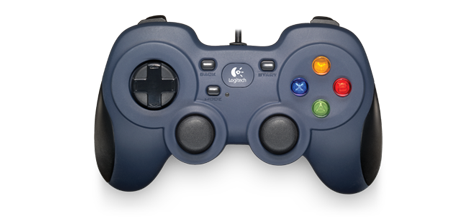
Logitech Gamepad

Logitech Gamepad F310

http://www.logitech.com/assets/32855/logitech-gamepad-f310.png

Movement - Dpad
Action Button B (Like Japan I prefer action button to be furthest to right aka O instead of traditional X)
Shield A
Weapon 1 X
Weapon 2 Y
Weapon 3 LT
Weapon 4 RT
Quickslot 1 LB
Quickslot 2 RB
Quickslot 3 Back
Quickslot 4 Start
Voice Chat Right POV Y-
Attack L3
Fall Back R3

Unmapped:

Left POV Z- and Z+
Left POV Y- and Y+

Sitio elaborado con Drupal, un sistema de gestión de contenido de código abierto